

Composite or Chained Projections 8.18
INFO
This feature was introduced in Marten 8.18 in response to feedback from several JasperFx Software clients who needed to efficiently create projections that effectively made de-normalized views across multiple stream types. Expect this feature to grow in capability as we get more feedback about its usage.
TIP
"Composite" projections are automatically running with a ProjectionLifecycle.Async lifecycle.
Here are a handful of scenarios that Marten users have hit over the years:
- Wanting to use the build products of Projection 1 as an input to Projection 2. You can do that today by running Projection 1 as
Inlineand Projection 2 asAsync, but that's imperfect and sensitive to timing. Plus, you might not have wanted to run the first projectionInline. - Needing to create a de-normalized projection view that incorporates data from several other projections and completely different types of event streams, but that previously required quite a bit of duplicated logic between projections
- Looking for ways to improve the throughput of asynchronous projections by doing more batching of event fetching and projection updates by trying to run multiple projections together
To meet these somewhat common needs more easily, Marten has introduced the concept of a "composite" projection where Marten is able to run multiple projections together and possibly divided into multiple, sequential stages. This provides some potential benefits by enabling you to safely use the build products of one projection as inputs to a second projection. Also, if you have multiple projections using much of the same event data, you can wring out more runtime efficiency by building the projections together so your system is doing less work fetching events and able to make updates to the database with fewer network round trips through bigger batches.
Let's jump right into an example using a "Telehealth" problem domain where patients of a medical service can request and be matched up for medical appointments with medical providers for online appointments.
That domain might have some plain Marten document storage for reference data including:
Provider-- representing a medical provider (Nurse? Physician? PA?) who fields appointmentsSpecialty-- models a medical specialtyPatient-- personal information about patients who are requesting appointments in our system
Switching to event streams, we may be capturing events for:
Board- events modeling a single, closely related group of appointments during a single day. Think of "Pediatrics in Austin, Texas for January 19th"ProviderShift- events modeling the activity of a single provider working in a singleBoardduring a single dayAppointment- events recording the progress of an appointment including requesting an appointment through the appointment being cancelled or completed
In this system, we need to have single stream "write model" projections for each of the three stream types. We also need to have a rich view of each Board that combines all the common state of the active Appointment and ProviderShift streams in that Board including the more static Patient and Provider information that can be used by the system to automate the assignment of providers to open patients (a real telehealth system would need to be able to match up the requirements of an appointment with the licensing, specialty, and location of the providers as well as "knowing" what providers are available or estimated to be available). We probably also need to build a denormalized "query model" about all appointments that can be efficiently queried by our user interface on any of the elements of Board, Appointment, Patient, or Provider.
What we really want is some way to efficiently utilize the upstream products and updates of the Board, Appointment, and ProviderShift "write model" projections as inputs to what we'll call the BoardSummary and AppointmentDetails projections. We'll use the new "composite projection" feature to run these projections together in two stages like this:
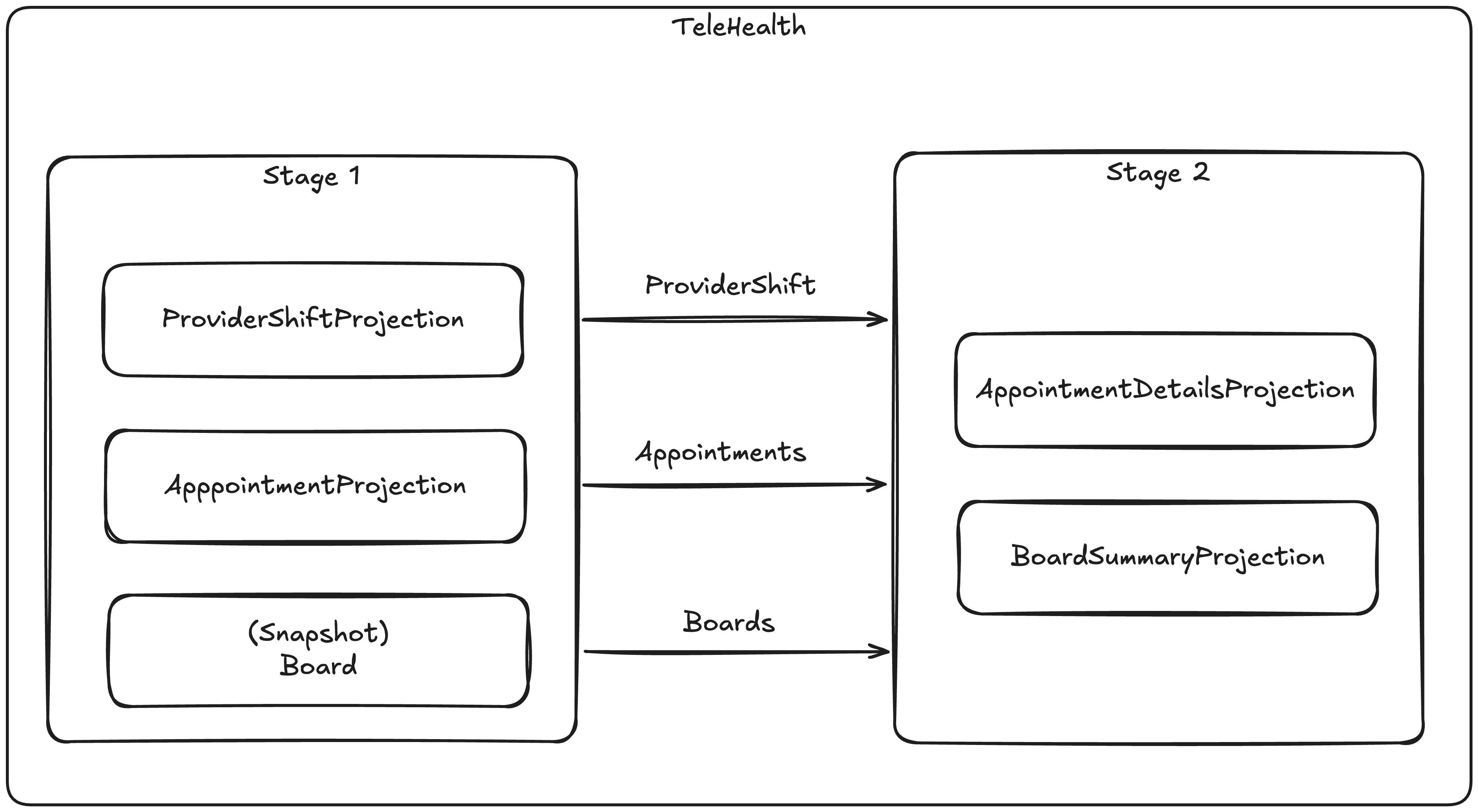
Before we dive into each child projection, this is how we can set up the composite projection using the StoreOptions model in Marten:~~~~
if(tenancyStyle == TenancyStyle.Conjoined)
{
    opts.Events.TenancyStyle = TenancyStyle.Conjoined;
    opts.Policies.AllDocumentsAreMultiTenantedWithPartitioning(x =>
    {
        x.ByHash(Enumerable.Range(1, 2).Select(i => $"b_{i}").ToArray());
    });
    opts.Advanced.DefaultTenantUsageEnabled = false;
}
opts.Projections.CompositeProjectionFor("TeleHealth", projection =>
{
    projection.Add<ProviderShiftProjection>();
    projection.Add<AppointmentProjection>();
    projection.Snapshot<Board>();
    projection.Add(new AppointmentMetricsProjection());

    // 2nd stage projections
    projection.Add<AppointmentDetailsProjection>(2);
    projection.Add<BoardSummaryProjection>(2);
    projection.Add<AppointmentByExternalIdentifierProjection>(2);
});First, let's just look at the simple ProviderShiftProjection:
public partial class ProviderShiftProjection: SingleStreamProjection<ProviderShift, Guid>
{
    public ProviderShiftProjection()
    {
        // Make sure this is turned on!
        Options.CacheLimitPerTenant = 1000;
    }

    public override async Task EnrichEventsAsync(SliceGroup<ProviderShift, Guid> group, IQuerySession querySession, CancellationToken cancellation)
    {
        await group

            // First, let's declare what document type we're going to look up
            .EnrichWith<Provider>()

            // What event type or marker interface type or common abstract type
            // we could look for within each EventSlice that might reference
            // providers
            .ForEvent<ProviderJoined>()

            // Tell Marten how to find an identity to look up
            .ForEntityId(x => x.ProviderId)

            // And finally, execute the look up in one batched round trip,
            // and apply the matching data to each combination of EventSlice, event within that slice
            // that had a reference to a ProviderId, and the Provider
            .EnrichAsync((slice, e, provider) =>
            {
                // In this case we're swapping out the persisted event with the
                // enhanced event type before each event slice is then passed
                // in for updating the ProviderShift aggregates
                slice.ReplaceEvent(e, new EnhancedProviderJoined(e.Data.BoardId, provider));
            });
    }

    public override ProviderShift Evolve(ProviderShift snapshot, Guid id, IEvent e)
    {
        switch (e.Data)
        {
            case EnhancedProviderJoined joined:
                snapshot = new ProviderShift(joined.BoardId, joined.Provider)
                {
                    Provider = joined.Provider, Status = ProviderStatus.Ready
                };
                break;

            case ProviderReady:
                snapshot.Status = ProviderStatus.Ready;
                break;

            case AppointmentAssigned assigned:
                snapshot.Status = ProviderStatus.Assigned;
                snapshot.AppointmentId = assigned.AppointmentId;
                break;

            case ProviderPaused:
                snapshot.Status = ProviderStatus.Paused;
                snapshot.AppointmentId = null;
                break;

            case ChartingStarted charting:
                snapshot.Status = ProviderStatus.Charting;
                break;
        }

        return snapshot;
    }

}Now, let's go downstream and look at the AppointmentDetailsProjection that will ultimately need to use the build products of all three upstream projections:
public partial class AppointmentDetailsProjection: MultiStreamProjection<AppointmentDetails, Guid>
{
    public AppointmentDetailsProjection()
    {
        Options.CacheLimitPerTenant = 1000;

        Identity<Updated<Appointment>>(x => x.Entity.Id);
        Identity<IEvent<ProviderAssigned>>(x => x.StreamId);
        Identity<IEvent<AppointmentRouted>>(x => x.StreamId);

        // This is a synthetic event published from upstream projections to identify
        // which projected Appointment documents were deleted as part of the current event range
        // so we can keep this richer model mirroring the simpler Appointment projection
        Identity<ProjectionDeleted<Appointment, Guid>>(x => x.Identity);
    }

    public override async Task EnrichEventsAsync(SliceGroup<AppointmentDetails, Guid> group, IQuerySession querySession,
        CancellationToken cancellation)
    {
        // Look up and apply specialty information from the document store
        // Specialty is just reference data stored as a document in Marten
        await group
            .EnrichWith<Specialty>()
            .ForEvent<Updated<Appointment>>()
            .ForEntityId(x => x.Entity.Requirement.SpecialtyCode)
            .AddReferences();

        // Also reference data (for now)
        await group
            .EnrichWith<Patient>()
            .ForEvent<Updated<Appointment>>()
            .ForEntityId(x => x.Entity.PatientId)
            .AddReferences();

        // Look up and apply provider information
        await group
            .EnrichWith<Provider>()
            .ForEvent<ProviderAssigned>()
            .ForEntityId(x => x.ProviderId)
            .AddReferences();

        // Look up and apply Board information that matches the events being projected
        await group
            .EnrichWith<Board>()
            .ForEvent<AppointmentRouted>()
            .ForEntityId(x => x.BoardId)
            .AddReferences();

        // Enrich RoutingReason documents based on a business key (ReasonCode),
        // not on the document id. This example also demonstrates how to use
        // the provided cache to avoid repeated database queries.
        await group
            .EnrichWith<RoutingReason>()
            .ForEvent<AppointmentRouted>()
            .EnrichUsingEntityQuery<string>(async (slices, events, cache, ct) =>
            {
                // Collect all distinct reason codes across the incoming events
                var reasonCodes = events
                    .Select(e => e.Data.ReasonCode)
                    .Where(x => x.IsNotEmpty())
                    .Distinct()
                    .ToArray();

                // Nothing to enrich if no reason codes are present
                if (reasonCodes.Length == 0)
                {
                    return;
                }

                // Try to resolve RoutingReason documents from the cache first
                // Note: cache may be null when there is no upstream aggregate cache for the entity type
                var missingCodes = cache != null
                    ? reasonCodes.Where(code => !cache.TryFind(code, out _)).ToList()
                    : reasonCodes.ToList();

                // Only query the database for codes that are not yet cached
                // Use a local dictionary for lookups when cache is unavailable
                var localLookup = new Dictionary<string, RoutingReason>();
                if (missingCodes.Count > 0)
                {
                    var reasonsFromDb = await querySession
                        .Query<RoutingReason>()
                        .Where(r => r.Code.IsOneOf(missingCodes))
                        .Where(r => r.IsActive)
                        .ToListAsync(ct);

                    // Store fetched documents in the cache (if available) and local lookup for reuse
                    foreach (var reason in reasonsFromDb)
                    {
                        cache?.Store(reason.Code, reason);
                        localLookup[reason.Code] = reason;
                    }
                }

                // Apply the resolved RoutingReason references per slice
                foreach (var slice in slices)
                {
                    // Snapshot the events first, referencing modifies slice state
                    var codesInSlice = slice.Events()
                        .OfType<IEvent<AppointmentRouted>>()
                        .Select(x => x.Data.ReasonCode)
                        .Where(x => x.IsNotEmpty())
                        .Distinct()
                        .ToArray();

                    foreach (var code in codesInSlice)
                    {
                        if ((cache != null && cache.TryFind(code, out var reason)) ||
                            localLookup.TryGetValue(code, out reason))
                        {
                            slice.Reference(reason);
                        }
                    }
                }
            }, cancellation);

    }

    public override AppointmentDetails Evolve(AppointmentDetails snapshot, Guid id, IEvent e)
    {
        switch (e.Data)
        {
            case AppointmentRequested requested:
                snapshot ??= new AppointmentDetails(e.StreamId);
                snapshot.SpecialtyCode = requested.SpecialtyCode;
                snapshot.PatientId = requested.PatientId;
                break;

            // This is an upstream projection. Triggering off of a synthetic
            // event that Marten publishes from the early stage
            // to this projection running in a secondary stage
            case Updated<Appointment> updated:
                snapshot ??= new AppointmentDetails(updated.Entity.Id);
                snapshot.Status = updated.Entity.Status;
                snapshot.EstimatedTime = updated.Entity.EstimatedTime;
                snapshot.SpecialtyCode = updated.Entity.SpecialtyCode;
                break;

            case References<Patient> patient:
                snapshot.PatientFirstName = patient.Entity.FirstName;
                snapshot.PatientLastName = patient.Entity.LastName;
                break;

            case References<Specialty> specialty:
                snapshot.SpecialtyCode = specialty.Entity.Code;
                snapshot.SpecialtyDescription = specialty.Entity.Description;
                break;

            case References<Provider> provider:
                snapshot.ProviderId = provider.Entity.Id;
                snapshot.ProviderFirstName = provider.Entity.FirstName;
                snapshot.ProviderLastName = provider.Entity.LastName;
                break;

            case References<Board> board:
                snapshot.BoardName = board.Entity.Name;
                snapshot.BoardId = board.Entity.Id;
                break;

            case References<RoutingReason> reason:
                snapshot.RoutingReasonCode = reason.Entity.Code;
                snapshot.RoutingReasonDescription = reason.Entity.Description;
                snapshot.RoutingReasonSeverity = reason.Entity.Severity;
                break;

            // The matching projection for Appointment was deleted
            // so we'll delete this enriched projection as well
            // ProjectionDeleted<TDoc> is a synthetic event that Marten
            // itself publishes from the upstream projections and available
            // to downstream projections
            case ProjectionDeleted<Appointment>:
                return null;
        }

        return snapshot;
    }

}TIP
The new Updated<T> synthetic event that we're using to communicate updates between projections can also be used within Apply(), Create, or ShouldDelete methods as well.
There is also a corresponding ProjectionDeleted<TDoc, TId> synthetic event that will communicate updates between projections and can also be used with Apply(), Create, or ShouldDelete methods.
The ProjectionDeleted<TDoc,TId> also implements some simpler interfaces ProjectionDeleted<TDoc> and DeletedIdentity<TId> that are available just as conveniences to avoid the proliferation of ugly generics in your code.
And also the definition for the downstream BoardSummary view:
public partial class BoardSummaryProjection: MultiStreamProjection<BoardSummary, Guid>
{
    public BoardSummaryProjection()
    {
        Options.CacheLimitPerTenant = 100;

        Identity<Updated<Appointment>>(x => x.Entity.BoardId ?? Guid.Empty);
        Identity<Updated<Board>>(x => x.Entity.Id);
        Identity<Updated<ProviderShift>>(x => x.Entity.BoardId);
    }

    public override Task EnrichEventsAsync(SliceGroup<BoardSummary, Guid> group, IQuerySession querySession, CancellationToken cancellation)
    {
        return group.ReferencePeerView<Board>();
    }

    public override (BoardSummary, ActionType) DetermineAction(BoardSummary snapshot, Guid identity, IReadOnlyList<IEvent> events)
    {
        snapshot ??= new BoardSummary { Id = identity };
        if (events.TryFindReference<Board>(out var board))
        {
            snapshot.Board = board;
        }

        var shifts = events.AllReferenced<ProviderShift>().ToArray();
        foreach (var providerShift in shifts)
        {
            snapshot.ActiveProviders[providerShift.ProviderId] = providerShift;

            if (providerShift.AppointmentId.HasValue)
            {
                snapshot.Unassigned.Remove(providerShift.ProviderId);
            }
        }

        foreach (var appointment in events.AllReferenced<Appointment>())
        {
            if (appointment.ProviderId == null)
            {
                snapshot.Unassigned[appointment.Id] = appointment;
                snapshot.Assigned.Remove(appointment.Id);
            }
            else
            {
                snapshot.Unassigned.Remove(appointment.Id);
                var shift = shifts.FirstOrDefault(x => x.Id == appointment.ProviderId.Value);

                snapshot.Assigned[appointment.Id] = new AssignedAppointment(appointment, shift?.Provider);
            }
        }

        return (snapshot, ActionType.Store);
    }
}Note the usage of the Updated<T> event types that the downstream projections are using in their Evolve or DetermineAction methods. That is a synthetic event added by Marten to communicate to the downstream projections what projected documents were updated for the current event range. These events are carrying the latest snapshot data for the current event range so the downstream projections can just use the build products without making any additional fetches. It also guarantees that the downstream projections are seeing the exact correct upstream projection data for that point of the event sequencing.
Moreover, the composite "telehealth" projection is reading the event range once for all seven constituent projections, and also applying the updates for all seven projections at one time to guarantee consistency.
Cross-stage document visibility
WARNING
A downstream stage cannot see the document writes of an upstream stage by issuing a SQL query against IQuerySession — those writes are still queued in the in-memory projection batch and have not been committed yet. The query goes to PostgreSQL, which has not received them.
All stages of a composite projection share a single IProjectionBatch that is flushed to the database once, after every stage has run. This is what makes the composite atomic, but it also means that during the execution of a later stage, the document writes produced by earlier stages are still queued in memory. A query like
// Inside a stage-2 projection's EnrichEventsAsync — DOES NOT see Appointment
// rows written by an upstream stage-1 projection in this same batch
var appointments = await querySession.Query<Appointment>().ToListAsync();
will return only what was committed by previous batches. During a RebuildProjectionAsync, where every event is replayed from scratch, neither the upstream nor the downstream documents have been committed yet, so the query returns an empty result for both.
Marten provides four supported ways for a downstream stage to consume upstream stage output:
Updated<T>andProjectionDeleted<T, TId>synthetic events. When an upstreamSingleStreamProjection<T>orMultiStreamProjection<T>updates or deletes a document, Marten injects a synthetic event into the downstream stage's event stream. The current snapshot ofTis carried directly on the event payload, so no database lookup is needed.EnrichWith<T>().ForEvent<E>().ForEntityId(...).AddReferences()(and the relatedEnrichAsyncoverloads). These walk the upstream's in-memory aggregate cache forTrather than the database, so they observe in-flight writes from earlier stages in the same batch. UseForEntityIdsJasperFx.Events 1.35 instead ofForEntityIdwhen a single event references several entities of the same type — see Fan-out enrichment.group.TryFindUpstreamCache<TId, T>(out var cache)JasperFx.Events 1.34 for custom enrichment callbacks (notably insideEnrichUsingEntityQuery) that need to look up an in-flight upstream entity by id when it isn't the type of the enclosingEnrichWith<T>. Returnsfalsewhen no upstream stage of this composite produces entities of that type — see the example below.group.ReferencePeerView<T>()for a parallel projected view that shares the same identity as the projection being built.
Direct use of querySession.Query<T>() from inside EnrichEventsAsync is appropriate for static reference data committed in earlier batches (for example the RoutingReason example above) and not for documents produced by upstream stages of the current batch.
JasperFx.Events 1.35
Per-projection aggregate caches are no longer compacted between stages of a composite — each stage's cache is kept at full size for the entire composite batch and trimmed as a unit at the composite boundary. Options.CacheLimitPerTenant is therefore a memory tunable again, not a correctness lever for downstream EnrichWith<T> / TryFindUpstreamCache lookups.
Looking up arbitrary upstream entities in EnrichUsingEntityQuery
EnrichUsingEntityQuery's callback receives a cache parameter typed for the enclosing EnrichWith<T>. When the callback also needs to read an in-flight upstream entity of a different type — for example a RoutingReason enrichment that needs to consult the upstream Appointment that is being projected in the same batch — call group.TryFindUpstreamCache<TId, T> against the captured SliceGroup to reach into the upstream stage's in-memory aggregate cache.
public override Task EnrichEventsAsync(SliceGroup<OrderShippingNotification, Guid> group,
    IQuerySession querySession, CancellationToken cancellation)
{
    // Ask the upstream OrderProjection (running earlier in the same composite stage)
    // for its in-memory aggregate cache. A SQL query for Order in this same batch
    // would return nothing — those writes are still queued on the shared
    // IProjectionBatch and have not been committed to PostgreSQL yet.
    if (!group.TryFindUpstreamCache<Guid, Order>(out var upstreamOrders))
    {
        // No upstream stage in this composite is producing Order documents.
        return Task.CompletedTask;
    }

    foreach (var slice in group.Slices)
    {
        if (upstreamOrders.TryFind(slice.Id, out var order))
        {
            // Stamp a synthetic References<Order> event onto the slice so that
            // the Evolve method can read the upstream entity's data.
            slice.Reference(order);
        }
    }

    return Task.CompletedTask;
}TryFindUpstreamCache returns false when no upstream stage of this composite is registered as producing entities of that type. The cache itself is kept at full size for the duration of the composite batch, so any entity the upstream just produced is reachable by id regardless of Options.CacheLimitPerTenant.
Things to Know About Composite Projections
- Composite projections can include any possible kind of projection including aggregations or event projections or flat table projections
- Composite projections can only run asynchronously
- In the event progression table, you will see rows for both the parent projection and all constituent projections -- but they should never be different values. This is so that you can later de-couple the projections and also to...
- The child parts of composite projections play nicely with
FetchForWriting,FetchLatest, andQueryForNonStaleData<T>()operators - You can apply versions to the composite projection itself, and that will overwrite the version of each child projection within the composite
- You can use as many stages as you wish, but we're not sure why you would need to use more than 2 or 3
- Side effects will work with composite projections, but they will be executed after the entire batch of changes are made for all constituent projections
- If you rebuild a composite projection, you will have to rebuild all constituent projections
Any other questions? You might have to reach out to the Marten team via Discord.