

Configuring Document Storage with StoreOptions
The StoreOptions object in Marten is the root of all of the configuration for a DocumentStore object. The static builder methods like DocumentStore.For(configuration) or IServiceCollection.AddMarten(configuration) are just syntactic sugar around building up a StoreOptions object and passing that to the constructor function of a DocumentStore:
public static DocumentStore For(Action<StoreOptions> configure)
{
    var options = new StoreOptions();
    configure(options);

    return new DocumentStore(options);
}The major parts of StoreOptions are shown in the class diagram below:
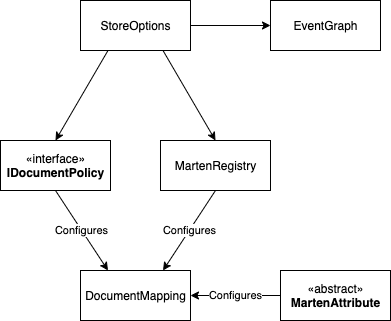
For some explanation, the major pieces are:
EventGraph-- The configuration for the Event Store functionality is all on theStoreOptions.Eventsproperty. See the Event Store documentation for more information.DocumentMapping-- This is the configuration for a specific document type including all indexes and rules for multi-tenancy, deletes, and metadata usageMartenRegistry-- TheStoreOptions.Schemaproperty is aMartenRegistrythat provides a fluent interface to explicitly configure document storage by document typeIDocumentPolicy-- Registered policies on aStoreOptionsobject that apply to all document types. An example would be "all document types are soft deleted."MartenAttribute-- Document type configuration can also be done with attributes on the actual document types
To be clear, the configuration on a single document type is applied in order by:
- Calling the static
ConfigureMarten(DocumentMapping)method on the document type. See the section below on Embedding Configuration in Document Types - Any policies at the
StoreOptionslevel - Attributes on the specific document type
- Explicit configuration through
MartenRegistry
The order of precedence is in the reverse order, such that explicit configuration takes precedence over policies or attributes.
TIP
While it is possible to mix and match configuration styles, the Marten team recommends being consistent in your approach to prevent confusion later.
Custom StoreOptions
It's perfectly valid to create your own subclass of StoreOptions that configures itself, as shown below.
public class MyStoreOptions: StoreOptions
{
    public static IDocumentStore ToStore()
    {
        return new DocumentStore(new MyStoreOptions());
    }

    public MyStoreOptions()
    {
        Connection(ConnectionSource.ConnectionString);

        Serializer(new JsonNetSerializer { EnumStorage = EnumStorage.AsString });

        Schema.For<User>().Index(x => x.UserName);
    }
}This strategy might be beneficial if you need to share Marten configuration across different applications or testing harnesses or custom migration tooling.
Explicit Document Configuration with MartenRegistry
While there are some limited abilities to configure storage with attributes, the most complete option right now is a fluent interface implemented by the MartenRegistry that is exposed from the StoreOptions.Schema property, or you can choose to compose your document type configuration in additional MartenRegistry objects.
To use your own subclass of MartenRegistry and place declarations in the constructor function like this example:
public class OrganizationRegistry: MartenRegistry
{
    public OrganizationRegistry()
    {
        For<Organization>().Duplicate(x => x.OtherName);
        For<User>().Duplicate(x => x.UserName);
    }
}To apply your new MartenRegistry, just include it when you bootstrap the IDocumentStore as in this example:
var store = DocumentStore.For(opts =>
{
    opts.Schema.For<Organization>().Duplicate(x => x.Name);
    opts.Schema.Include<OrganizationRegistry>();
    opts.Connection(ConnectionSource.ConnectionString);
});Do note that you could happily use multiple MartenRegistry classes in larger applications if that is advantageous.
If you dislike using infrastructure attributes in your application code, you will probably prefer to use MartenRegistry.
Lastly, note that you can use StoreOptions.Schema property for all configuration like this:
var store = DocumentStore.For(opts =>
{
    opts.Connection(ConnectionSource.ConnectionString);
    opts.Schema.For<Organization>()
        .Duplicate(x => x.OtherName);

    opts.Schema
        .For<User>().Duplicate(x => x.UserName);
});Custom Attributes
If there's some kind of customization you'd like to use attributes for that isn't already supported by Marten, you're still in luck. If you write a subclass of the MartenAttribute shown below:
public abstract class MartenAttribute: Attribute
{
    /// <summary>
    ///     Customize Document storage at the document level
    /// </summary>
    /// <param name="mapping"></param>
    public virtual void Modify(DocumentMapping mapping) { }

    /// <summary>
    ///     Customize the Document storage for a single member
    /// </summary>
    /// <param name="mapping"></param>
    /// <param name="member"></param>
    public virtual void Modify(DocumentMapping mapping, MemberInfo member) { }

    /// <summary>
    /// When used with the automatic type discovery (assembly scanning), this will be called
    /// to make registrations to the Marten configuration with the type that this attribute
    /// decorates
    /// </summary>
    /// <param name="discoveredType"></param>
    /// <param name="options"></param>
    public virtual void Register(Type discoveredType, StoreOptions options){}
}And decorate either classes or individual field or properties on a document type, your custom attribute will be picked up and used by Marten to configure the underlying DocumentMapping model for that document type. The MartenRegistry is just a fluent interface over the top of this same DocumentMapping model.
As an example, an attribute to add a gin index to the JSONB storage for more efficient adhoc querying of a document would look like this:
[AttributeUsage(AttributeTargets.Class)]
public class GinIndexedAttribute: MartenAttribute
{
    public override void Modify(DocumentMapping mapping)
    {
        mapping.AddGinIndexToData();
    }
}Embedding Configuration in Document Types
Lastly, Marten can examine the document types themselves for a public static ConfigureMarten() method and invoke that to let the document type make its own customizations for its storage. Here's an example from the unit tests:
public class ConfiguresItself
{
    public Guid Id;

    public static void ConfigureMarten(DocumentMapping mapping)
    {
        mapping.Alias = "different";
    }
}The DocumentMapping type is the core configuration class representing how a document type is persisted or queried from within a Marten application. All the other configuration options end up writing to a DocumentMapping object.
You can optionally take in the more specific DocumentMapping<T> for your document type to get at some convenience methods for indexing or duplicating fields that depend on .Net Expression's:
public class ConfiguresItselfSpecifically
{
    public Guid Id;
    public string Name;

    public static void ConfigureMarten(DocumentMapping<ConfiguresItselfSpecifically> mapping)
    {
        mapping.Duplicate(x => x.Name);
    }
}Document Policies
Document Policies enable convention-based customizations to be applied across the Document Store. While Marten has some existing policies that can be enabled, any custom policy can be introduced through implementing the IDocumentPolicy interface and applying it on StoreOptions.Policies or through using the Policies.ForAllDocuments(Action<DocumentMapping> configure) shorthand.
The following sample demonstrates a policy that sets types implementing IRequireMultiTenancy marker-interface to be multi-tenanted (see tenancy).
var store = DocumentStore.For(storeOptions =>
{
    // Apply custom policy
storeOptions.Policies.OnDocuments<TenancyPolicy>();The actual policy is shown below:
public interface IRequireMultiTenancy
{
}

public class TenancyPolicy: IDocumentPolicy
{
    public void Apply(DocumentMapping mapping)
    {
        if (mapping.DocumentType.GetInterfaces().Any(x => x == typeof(IRequireMultiTenancy)))
        {
            mapping.TenancyStyle = TenancyStyle.Conjoined;
        }
    }
}To set all types to be multi-tenanted, the pre-baked Policies.AllDocumentsAreMultiTenanted could also have been used.
Remarks: Given the sample, you might not want to let tenancy concerns propagate to your types in a real data model.
Configuring the Database Schema
By default, Marten will put all database schema objects into the main public schema. If you want to override this behavior, use the StoreOptions.DocumentSchemaName property when configuring your IDocumentStore:
var store = DocumentStore.For(opts =>
{
    opts.Connection("some connection string");
    opts.DatabaseSchemaName = "other";
});If you have some reason to place different document types into separate schemas, that is also supported and the document type specific configuration will override the StoreOptions.DatabaseSchemaName value as shown below:
var store = DocumentStore.For(opts =>
{
    opts.Connection("some connection string");
    opts.DatabaseSchemaName = "other";

    // This would take precedence for the
    // User document type storage
    opts.Schema.For<User>()
        .DatabaseSchemaName("users");
});PostgreSQL Limits on Naming
PostgreSQL has a default limitation on the length of database object names (64). This can be overridden in a PostgreSQL database by setting the NAMEDATALEN property.
This can unfortunately have a negative impact on Marten's ability to detect changes to the schema configuration when PostgreSQL quietly truncates the name of database objects. To guard against this, Marten will now warn you if a schema name exceeds the NAMEDATALEN value, but you do need to tell Marten about any non-default length limit like so:
var store = DocumentStore.For(_ =>
{
    // If you have overridden NAMEDATALEN in your
    // Postgresql database to 100
    _.NameDataLength = 100;
});Prepared Statements and Max Auto Prepare
Marten does not use PostgreSQL prepared statements, and there is no Marten API to turn them on. That is a deliberate choice rather than a gap, and this section exists to record both the option you do have and why it is not the default.
Npgsql can prepare statements automatically, and it is enabled purely through the connection string, so it needs nothing from Marten:
Host=localhost;Database=marten;Username=postgres;Password=...;Max Auto Prepare=50;Auto Prepare Min Usages=2Nothing in Marten blocks the mechanism. Marten binds values as parameters throughout — including LIMIT and OFFSET — so the generated SQL text is stable across calls and pages, and auto-prepare will genuinely reuse plans rather than thrash.
Set your expectations low
We measured it. On a warm connection, past the minimum-usage threshold:
| query | default | Max Auto Prepare=50 |
|---|---|---|
| unindexed JSONB scan returning 10 rows | 40,102 μs | 39,840 μs |
| indexed duplicated column returning 1 row | 430 μs | 365 μs |
| the same single row via a compiled query | 364 μs | 391 μs |
Those land on both sides of zero with overlapping error bars, which is to say there was no measurable effect on read latency. That fits the mechanism: PREPARE saves the server's parse and plan time for a statement, which for a simple single-table query is tens of microseconds, against a cost dominated by JSONB extraction, sorting, moving documents over the wire, and deserializing them on the client.
Why it is not on by default
The reasons to be careful are more specific than the reasons to be hopeful:
- Generic plans. After a handful of executions PostgreSQL may switch a prepared statement to a generic plan that ignores the actual parameter values. If you use conjoined multi-tenancy, a heavily skewed
tenant_idappears in nearly every predicate — exactly the data shape where a generic plan can be dramatically worse than a fresh one. - Memory is per connection. Prepared statements are cached on each physical connection, so the server-side cost scales with pool size multiplied by
Max Auto Prepare. - Runtime schema changes. Marten applies schema changes at runtime under its automatic schema creation modes, and DDL can invalidate plans cached on connections already in the pool.
If you do turn it on, treat it as a per-deployment tuning decision, measure it against your own workload, and watch for plan regressions on your most skewed columns rather than assuming a win.
Translating Database Errors into Your Own Exceptions
Marten translates the errors PostgreSQL reports before you see them. A serialization failure (40001) becomes a ConcurrentUpdateException, and anything else from Npgsql becomes a MartenCommandException carrying the failing SQL. If your own SQL raises errors of its own, such as a guard function queued with QueueSqlCommand that refuses a write with a custom SQLSTATE, register a transform so your callers receive a typed exception instead of digging through InnerException:
var store = DocumentStore.For(opts =>
{
    opts.Connection(connectionString);

    opts.Advanced.ExceptionTransforms.IfExceptionIs<PostgresException>()
        .If(e => e.SqlState == "CT001")
        .ThenTransformTo(e => new GuardRefusedException(e));
});
Your transforms are consulted before Marten's built-in ones, on writes, raw SQL and LINQ queries alike. An error none of them claims still gets Marten's usual translation. A transform that matches an error Marten also translates, such as 40001, replaces Marten's translation for that store. Transforms belong to the store they are registered on, never to the whole process.